
Claude Code CLI Guide 2026 — Install, Configure API Key & Run
Step-by-step tutorial to install Claude Code CLI from the terminal on macOS, Linux, and Windows — set the API key in settings.json, run the `claude` command, and fix common issues.
About the product used in this article
The installation, configuration, and usage steps in this article are based on the [Claude Code] product provided by ngaicode.
We offer [Claude Code] plans starting from $1.50. After purchasing any plan, you’ll receive an API KEY with a detailed tutorial. If you encounter any issues during installation, setup, or use, our support team is always available to help.
To subscribe to [Claude Code], view plans and pricing at the Claude Code product page or contact customer support to place an order.
Contact us: WhatsApp Contact us — PayPal & USDT TRC20 payments accepted. Replies within 5 minutes during business hours (9:00–24:00 UTC+7).
1: Claude Code CLI — Install, Configure, and Use
1.1 Install Claude Code CLI
# MacOS, Linux, WSL
curl -fsSL https://claude.ai/install.sh | bash
# Windows PowerShell
irm https://claude.ai/install.ps1 | iex# Windows CMD
curl -fsSL https://claude.ai/install.cmd -o install.cmd && install.cmd && del install.cmd1.2 Configure the Claude CLI KEY
{
  "env": {
    "ANTHROPIC_API_KEY": "replace with your API key",
    "ANTHROPIC_AUTH_TOKEN": "replace with your API key",
    "ANTHROPIC_BASE_URL": "https://api.ccpro.cn",
    "CLAUDE_CODE_DISABLE_NONESSENTIAL_TRAFFIC": "1"
  },
  "permissions": {
    "allow": [],
    "deny": []
  }
}
1.3 Using Claude
Once configuration is complete, just run
claudein your terminal and you’re ready to go.
2: Use Alongside the Claude App
We recommend using CCswitch or similar tools to manage and switch configurations easily. See the tutorial for details: See the App tutorial for configuring CCswitch
3: Troubleshooting
Q: Official Documentation
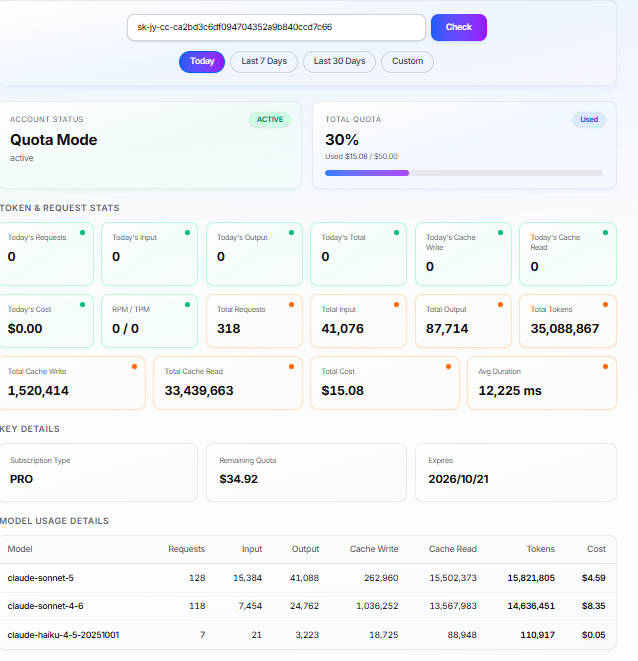
Q: Check KEY Usage / Quota
Click the link below and enter your KEY to check quota usage. Quota usage matches the official version 1:1.
https://ngaicode.com/en/key-usage/
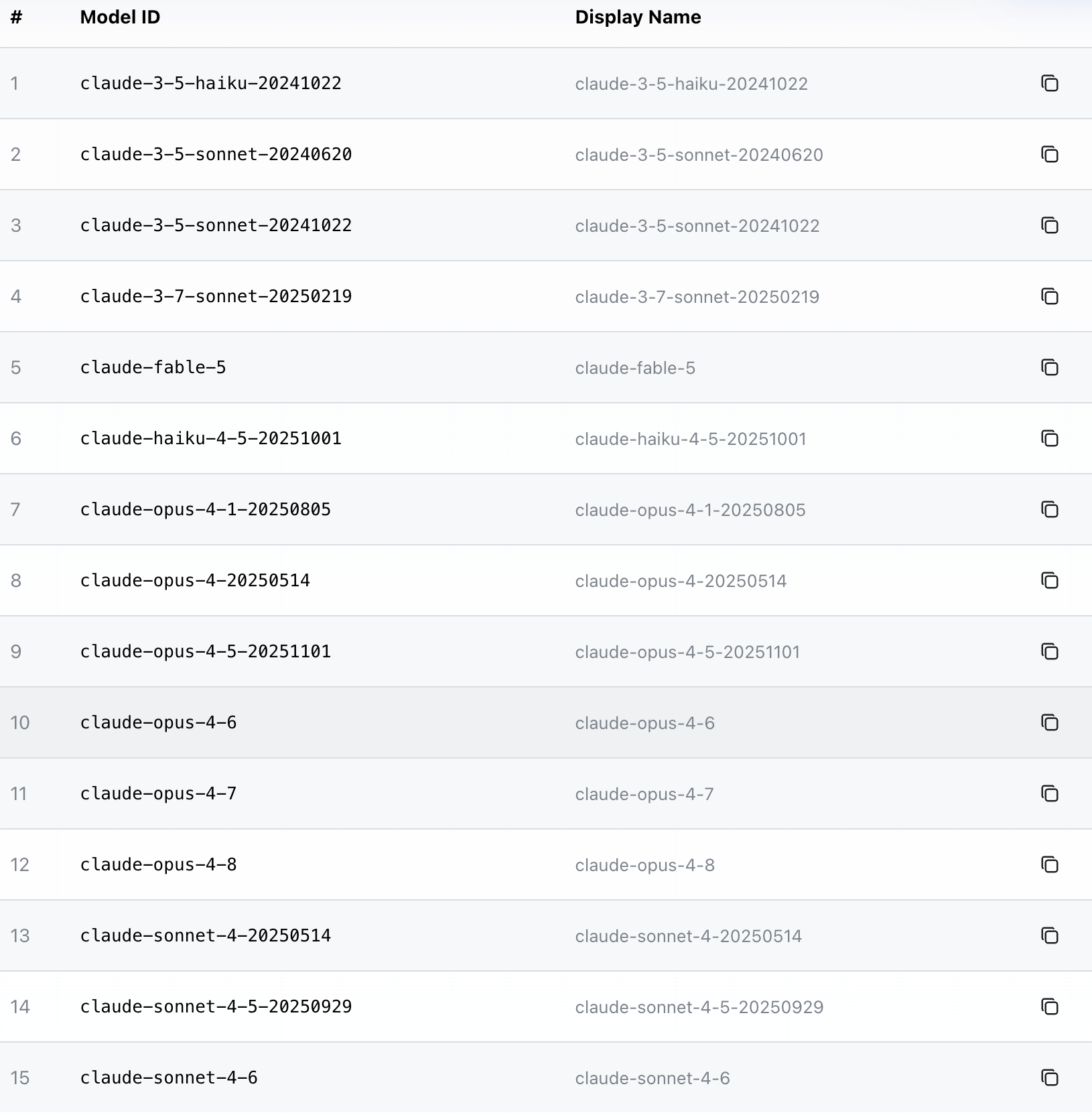
Q: List of Available Models
View available models for Claude
When you start a conversation, the key is activated automatically. After that, you’ll be able to view the list of models. For example:
Related Resources
- ngaicode Claude Code page — see pricing / order
- ngaicode Home — hub for AI Coding Tools
- ngaicode Cursor page
- ngaicode Codex page
- WhatsApp Contact us
Ready to Get Claude Code CLI?
3 simple steps: Pick a Claude Code plan → Scan PromptPay / PayPal → Receive your API key instantly
- Order Claude Code from ngaicode: ngaicode Claude Code page — plans start at $1.50 / month
- Questions / orders: WhatsApp Contact us — real human reply within 5 minutes
- See all 3 AI coding tools: ngaicode Home — Cursor / Codex / Claude Pro